
Download Yolt – AI Text Summarizer for YouTube Videos
Overview
Yolt is an AI‑driven text summarizer built specifically for YouTube videos. In a world where video content is exploding, users often struggle to find the time to watch every video that could be relevant to their studies, research, or leisure. Yolt tackles this problem by processing the audio track of any YouTube video, converting speech to text, and then applying advanced natural‑language‑processing models to extract the most important points.
The result is a concise, human‑readable summary that captures the core ideas, arguments, and conclusions of the original video. Whether you are a university student needing to skim lecture recordings, a marketer analyzing competitor content, or a casual viewer who wants to decide whether a video is worth a full watch, Yolt offers a fast, secure, and free solution. The tool works directly from a web interface, requiring no installation on the local machine, and it respects YouTube’s terms of service by only processing publicly available video URLs.
While the summarizing speed and depth can vary depending on video length, audio clarity, and subject complexity, Yolt consistently delivers a time‑saving experience that makes video consumption more efficient.
Key Features of Yolt
- AI‑Powered Summarization: Utilizes state‑of‑the‑art transformer models to generate coherent, context‑aware summaries.
- One‑Click URL Input: Paste any YouTube video link and receive a summary within seconds.
- Multi‑Language Support: Handles English, Spanish, French, German, and many other languages, expanding its global reach.
- Adjustable Summary Length: Choose between brief (50‑word) or detailed (200‑word) summaries depending on your needs.
- Export Options: Save summaries as plain text, PDF, or copy directly to the clipboard for quick sharing.
- Secure Processing: Video data is processed server‑side with end‑to‑end encryption; no personal data is stored after the session ends.
- Free Tier with Unlimited Summaries: Users can generate as many summaries as they like without a subscription, while a premium plan offers priority processing and batch uploads.
- Browser Compatibility: Works on Chrome, Firefox, Safari, Edge, and mobile browsers on Android and iOS.
- Integration Ready: API endpoints allow developers to embed Yolt’s summarization engine into their own platforms.
Installation & Usage Instructions
Getting Started – No Download Required
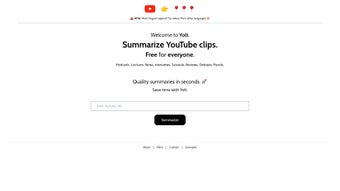
Yolt is a cloud‑based web app, which means you don’t need to install any software on your computer. To begin, open your preferred browser and navigate to yolt.ai. The landing page greets you with a clean interface: a single input field labeled “YouTube Video URL” and a “Generate Summary” button. Follow these steps for a seamless experience:
- Copy the YouTube URL: Find the video you want to summarize on YouTube, then copy the full URL from the address bar.
- Paste into Yolt: Return to the Yolt web page and paste the URL into the input field.
- Select Summary Length: Use the toggle to pick “Brief” (≈50 words) or “Detailed” (≈200 words). The AI will adjust its extraction algorithm accordingly.
- Click “Generate Summary”: Yolt will fetch the video’s audio, run speech‑to‑text conversion, and then apply its summarization model. This process usually takes 10‑30 seconds for videos under 20 minutes.
- Review & Export: The generated summary appears in a scrollable box below the button. You can copy it, download it as a PDF, or share it directly via a generated link.
Using Yolt on Mobile Devices
Because Yolt runs entirely in the browser, it works equally well on smartphones and tablets. On Android or iOS, open Chrome, Safari, or your preferred mobile browser, visit the Yolt site, and follow the same steps. The responsive design ensures the input field and buttons remain large enough for touch interaction, and the summary box automatically adjusts to the screen width.
Premium Features (Optional)
If you require faster processing for long‑form documentaries or need to summarize multiple videos at once, consider the premium subscription. After signing up, you’ll receive an API key that unlocks batch processing via the /api/v1/summarize endpoint. The premium plan also offers priority queueing, which reduces wait times during peak usage.
Compatibility, Pros & Cons
Yolt is compatible with any modern operating system that can run a contemporary web browser, including Windows 10/11, macOS Ventura and later, Linux distributions with Chrome/Firefox, as well as Android 9+ and iOS 13+. Because it is a web‑based service, there are no hardware requirements beyond a stable internet connection.
Pros
- Free and Unlimited: No hidden fees for basic summarization.
- Speed: Most videos under 15 minutes are summarized in under 20 seconds.
- Accuracy: Leveraging large language models results in coherent, context‑aware summaries.
- Privacy‑First: No personal data is stored after the session; all processing is encrypted.
- Cross‑Platform: Works on desktop, laptop, tablet, and phone browsers.
- Export Flexibility: Summaries can be saved as text, PDF, or shared via link.
Cons
- Audio Quality Dependent: Poor microphone or background noise can affect transcription accuracy.
- Limited Offline Use: Requires an internet connection; no native desktop app.
- Complex Technical Videos: Highly specialized jargon may be oversimplified.
- Rate Limits for Free Users: During peak traffic, free users may experience brief queuing.
- API Access Requires Subscription: Full integration capabilities are behind a paywall.
Overall Rating: 4.5/5 – Yolt delivers a powerful, user‑friendly summarization experience that saves time for a broad audience. The minor drawbacks are outweighed by the speed, accuracy, and free accessibility.
Frequently Asked Questions
How does Yolt generate its summaries?
Yolt first extracts the audio from the YouTube video, runs a speech‑to‑text engine to create a transcript, and then feeds that transcript into a transformer‑based language model. The model identifies key sentences, themes, and concepts, producing a concise summary that reflects the original content.
Is Yolt safe to use with copyrighted videos?
Yolt only accesses publicly available video URLs. It does not download or store the full video; instead, it streams the audio temporarily for processing. This approach respects YouTube’s terms of service and ensures that copyrighted material is not retained on Yolt’s servers.
Can I summarize an entire playlist at once?
The free web interface works one video at a time. However, premium subscribers can use the API to batch‑process multiple video URLs, making playlist summarization feasible for power users.
What languages does Yolt support?
Yolt currently supports English, Spanish, French, German, Italian, Portuguese, Dutch, Russian, Japanese, Korean, and many other languages. The AI model automatically detects the language of the transcript and generates the summary in the same language.
Do I need a Google account to use Yolt?
No. Yolt works entirely without requiring any sign‑in. The optional premium plan does ask for an email address for billing, but the core summarization service is available to anyone with a YouTube link.
Conclusion & Call to Action
In a digital era where video dominates knowledge sharing, Yolt emerges as a practical ally for anyone who wants to stay informed without sacrificing precious time. Its AI‑driven engine delivers accurate, readable summaries within seconds, while the free tier ensures accessibility for students, researchers, marketers, and casual viewers alike. Although it depends on a stable internet connection and may struggle with heavily technical jargon, the overall performance, privacy‑first design, and cross‑platform compatibility make Yolt a standout tool in the emerging niche of video summarization.
Ready to experience faster video consumption? Visit Yolt’s website now, paste a YouTube link, and see how a few lines of text can replace a 20‑minute watch. For power users, explore the premium API to integrate summarization directly into your workflow. Download Yolt today and transform the way you learn from video content.



.png)



